
Reality Check
After countless virtual flights from runway twenty-two, I got a chance to compare notes between X-Plane and reality.
When I first purchased X-Plane, like many, I loaded up my home airports. The main regional airport is on the east side of the river and the small county airport is on the west. I’ve practiced virtual pattern work at the county airport, as well as doing countless short hops from the regional to the county.
This past week I had a business trip flying out of the regional airport. As a passenger aboard a CRJ900, I found the departure especially exciting. I’d been on the virtual versions of all of the airport’s runways and taxiways and knew them well. I knew how to read the assorted signs and taxiway markings. I could see the hold short lines approaching ahead, and expected the airplane to stop and await clearance. As it did, I eyed the block numbers on the runway. 22. I visualized the two-hundred and twenty degree heading out of the airport, pointing southwest, and produced a mental image of the VFR landmarks I’d spot after take off. And here I was very curious - would I be able to pick out the small county airport from the air, and how would it compare to my virtual experience?
The jet rolled down runway twenty-two and rotated, smoothly ascending. I watched the main airport drop away, eyeing the general aviation area and trying to pick out the models of the assorted aircraft parked there. Green grass spun by, then the white roof tops of an industrial complex. To the right, the blue-gray of a winding river appeared.
When I practiced my virtual pattern work, I used two islands in the river as reference points. They were easy to spot in real life from my window seat. And here is where my jaw dropped. They were so close. Walking distance close, and huge. The small county airport also wasn’t so small, its surrounding grass swathe impossible to miss (although the runway itself was difficult to make out, blending in with the landscape).
My brain stumbled trying to readjust its reality. It’s like thinking a house is a mile away when in fact its right across the street. Was X-Plane wrong in its depiction? Had I been experiencing the thirty-seven Pixel Plane airports through binoculars held backwards? I loaded up the same flight in X-Plane, now with a Cessna 172, and checked it out.

The island is on the right near the bottom of the head rest. The airport field is on the right 3/4 of the way down the wing strut.
There it is, above. A bit hard to see unless you know what you’re looking for. It’s a little easier with an exterior view of the plane:

Field on left, island on right.
I checked the Cessna’s Garmin. 2272 feet to the county airport from my position in the sky. It actually was walking-distance close.
This perhaps is one of the best arguments for VR. It’s a matter of scale and depth. On my 13” laptop screen the field is just under 2” wide, which looks tiny and distant. Now, indulge me in this mental exercise. Take a moment and look up. Mentally place markers at the furthest left and right point in your field-of-view. Divide that view into six equal pieces. One of those pieces would would be the airport. Big, isn’t it! Something which takes up 1/6 of your visual field when viewed from a three-thousand foot altitude must be large and close. Now, add depth perception to that mental image. That’s a very different experience than a 2” collection of pixels on a computer screen.
I admit I’m still not 100% sold on VR, mainly because of my play style (I gave up a desktop long ago in favor of a laptop’s portability), but I’d be curious to experience how different flying would look at full scale with depth perception. It’d be like turning the binoculars around and looking through them the correct way.
The last comment I’ll make from my real-life flight is that it was a partly-sunny day with brilliant white clouds scattered in drifting pockets. For all of X-Plane’s amazing photo-realism, it can’t come close to the beauty and complexity of a real sky. Hopefully future versions will bridge the beauty gap, because the views are half the fun of flying.
Cutting the Cord
Living the dream of going cable free.
"I've paid twenty-thousand dollars to Comcast over the past ten years," my co-worker said, "and I just can't do it anymore."
Twenty-thousand, I thought, that can't be right.
It turns out that it's not right. My current Comcast bill is $301 per month. Times 12 months equals $3612 annually. Times ten years equals $36,210. You can buy a brand new Audi Q3 for $36,210.
Last year I tried to lower my bill (which is a bundle of phone, internet, and cable) by dropping premium channels, cutting channels, dropping phone service, and lowering internet speed. The result was $1 more expensive per month than my current bundle. This is because seemingly Comcast has a big flowchart which returns all options to the same price point.
My experience talking to Comcast customer service
So, I've been scheming and dreaming of how to go cable free. This week I started the grand experiment of cutting the cord.
When DirectTvNow offered a promo - subscribe for three months at $35 per month and get a free $179 Apple TV 4K, it seemed like a zero risk proposition. I'd already been thinking of upgrading my 2nd generation Apple TV to a 4K.
First, let me say WOW. The difference in picture quality between the 2nd Gen and 4K is amazing. Second, the addition of the full app store, including games, significantly changes the functionality of my Apple TV. I already have a MiFi controller for playing video games with my daughter.

Playing games like Asphalt 8 with a controller on Apple TV 4K is a surprisingly rewarding console experience
The Apple TV 4k comes with a small touch-surface gesture-swipe remote which has a basic wii-controller-style accelerometer. It has a Siri button, which I'm used to for Comcast voice commands, so that's helpful. It makes me miss my old remote, which had click-buttons instead of a touch-surface. I wish more companies would find the value in physical buttons and stop moving everything to touch gestures (especially for tasks where your eyes are somewhere else).

I don't know how many times I've picked this up upside-down. The top half above the menu is the swipe surface/clicker. The bottom half is for holding.
DirectTVNow works great. The experience is just like the cable guide you're used to. It also includes a basic cloud DVR service at no cost. Best of all, it counts as a cable provider, which means all of the network apps link with it. And, with Apple TV, there are a ridiculous amount of Network apps. You could easily watch all your usual channels without even opening the DirectTVNow app. In general, we just open the network app and stream whatever episodes we want of our favorite shows.
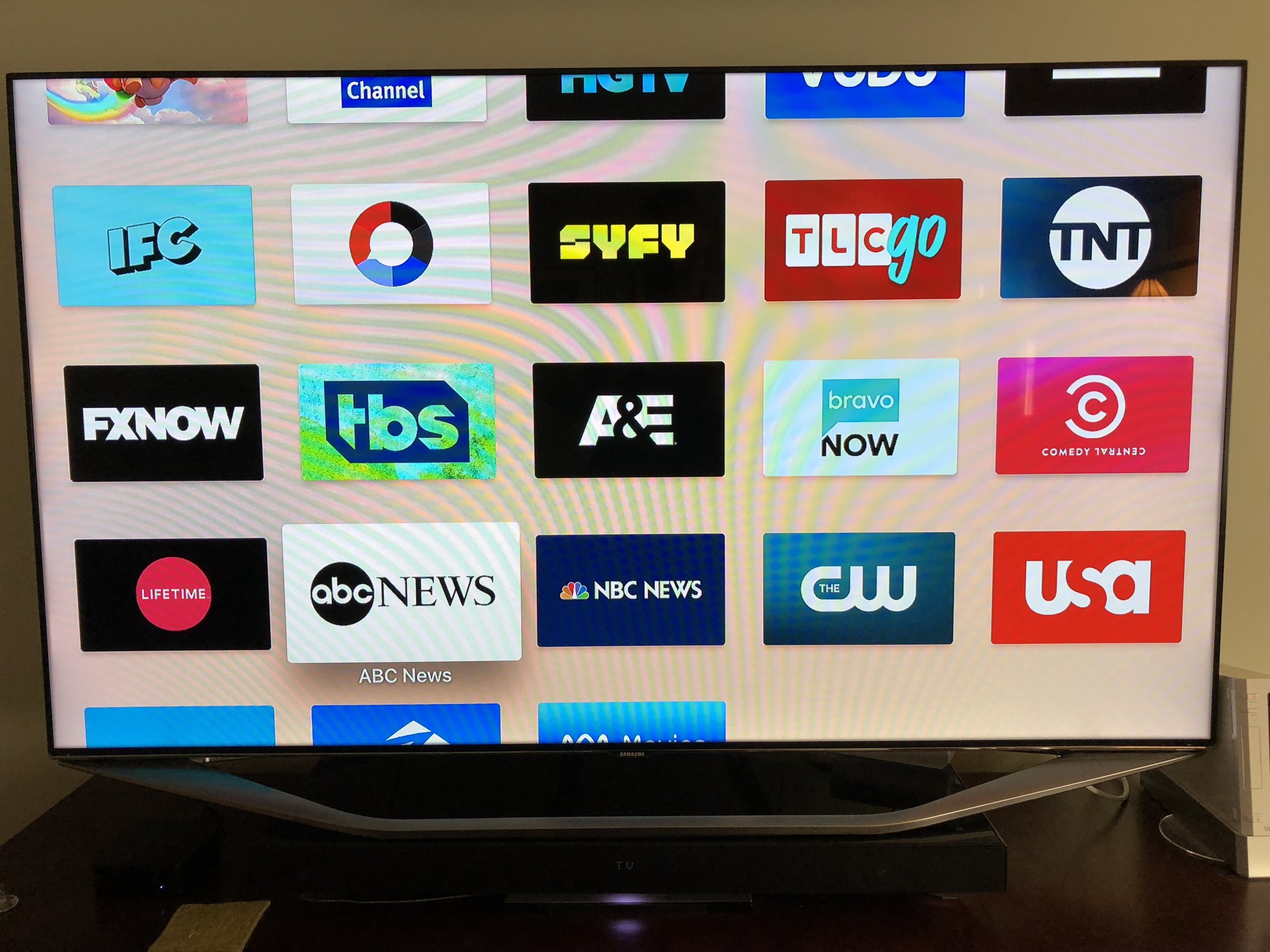
You have to register and activate every single app, then link them to your DirectTVNow account. Once you do, you can stream virtually every show on the network. Some even stream live TV.
Here's where I hit my first hiccup: local channels. Depending upon where you live, your local channels may not be licensed (yet) for streaming via DirectTVNow Where I live, only Fox is licensed.
Of course, the only thing you actually need to watch local channels is an antenna, so I purchased an HD antenna. To my surprise, it receives twenty-six channels over the air. Another surprise is that many of the network apps will stream your local channels. For example, the NBC app will stream your local NBC station live.
Next hiccup: No way to record over-the-air local channels.
Attempted solution: HD Home Run.
HD Home Run is a small box which you plug into your HD antenna and internet router. It then streams the signal to your TV (or other screens, such as iPad). The HD Home Run costs $99 and the Channels app costs $24.99. If you want to add DVR functionality, the subscription is $35 per year.
So, I bought one. And, it sucks.*
First of all, even though the HD Home Run is a wifi streaming device, you cannot wirelessly connect to it. You must use an ethernet cable to physically plug it into your router. This means you must relocate your HD antenna to wherever your router is located. In my case, this was in my basement, which is a bad place to receive antenna signals.
Second, the DVR service isn't a really a service. By "service", they mean that if you stream your content to your Mac or PC, they will enable the record feature in their software on your Mac or PC, which will turn your computer's hard drive into a DVR. The instructions are to keep your computer on 24/7 and disable sleep mode. Also, you probably should not have a notebook computer, like I do.
So, I'm returning it.
There's literally one show I want to record on broadcast tv. I could by a Tivo, but $400 seems overkill for one show. I may just sit tight until DirectTV gets licensing for NBC.
Anyway, otherwise I'm pleasantly surprised and very happy with my cord-cutting experiment. I'm going to run parallel paths - keeping my cable subscription for the month until I'm sure there's no other hiccups, but I can see myself living the cable-free dream.
Edit:
* HD Home Run is actually a very good streaming media device, and integrates nicely with apps like Channels to let you watch live OTA TV through your Apple TV. I just find its DVR software clunky, not well-integrated, and not what I'm looking for as a DVR solution.

A Case for Cases - Update
After a month of use, I give an update on my iPhone X case results.
Last month I bought an iPhone X. I have no regrets - it's an awesome phone. But, it is a glass bar of soap, and this necessitates a case.
As an engineer, I have a knack of overthinking things. This was the case with my case. I wanted the saddle brown leather case, but rationalized myself into the silicone case. In the end, however, heart triumphed over mind and I chose the leather.
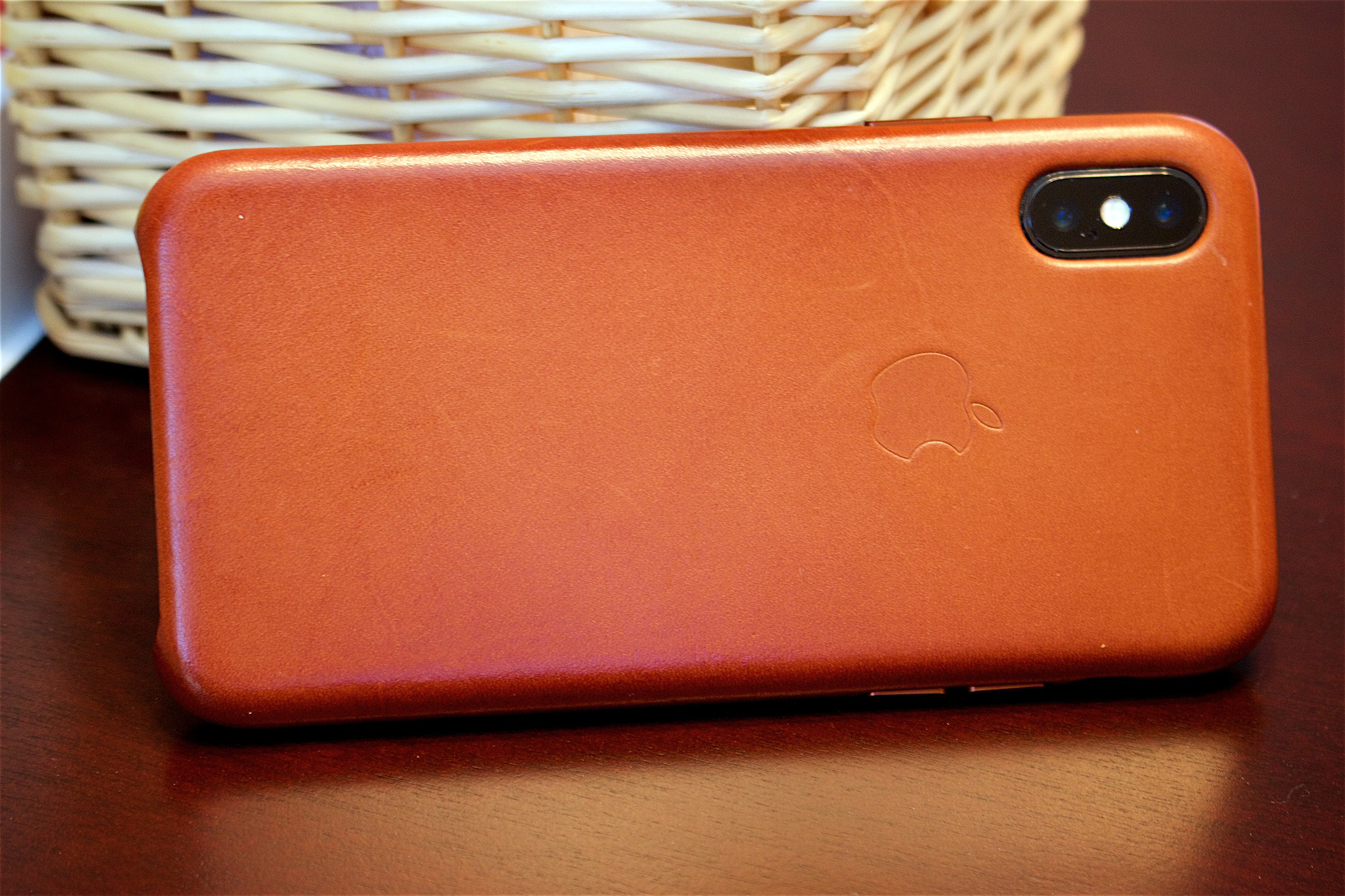
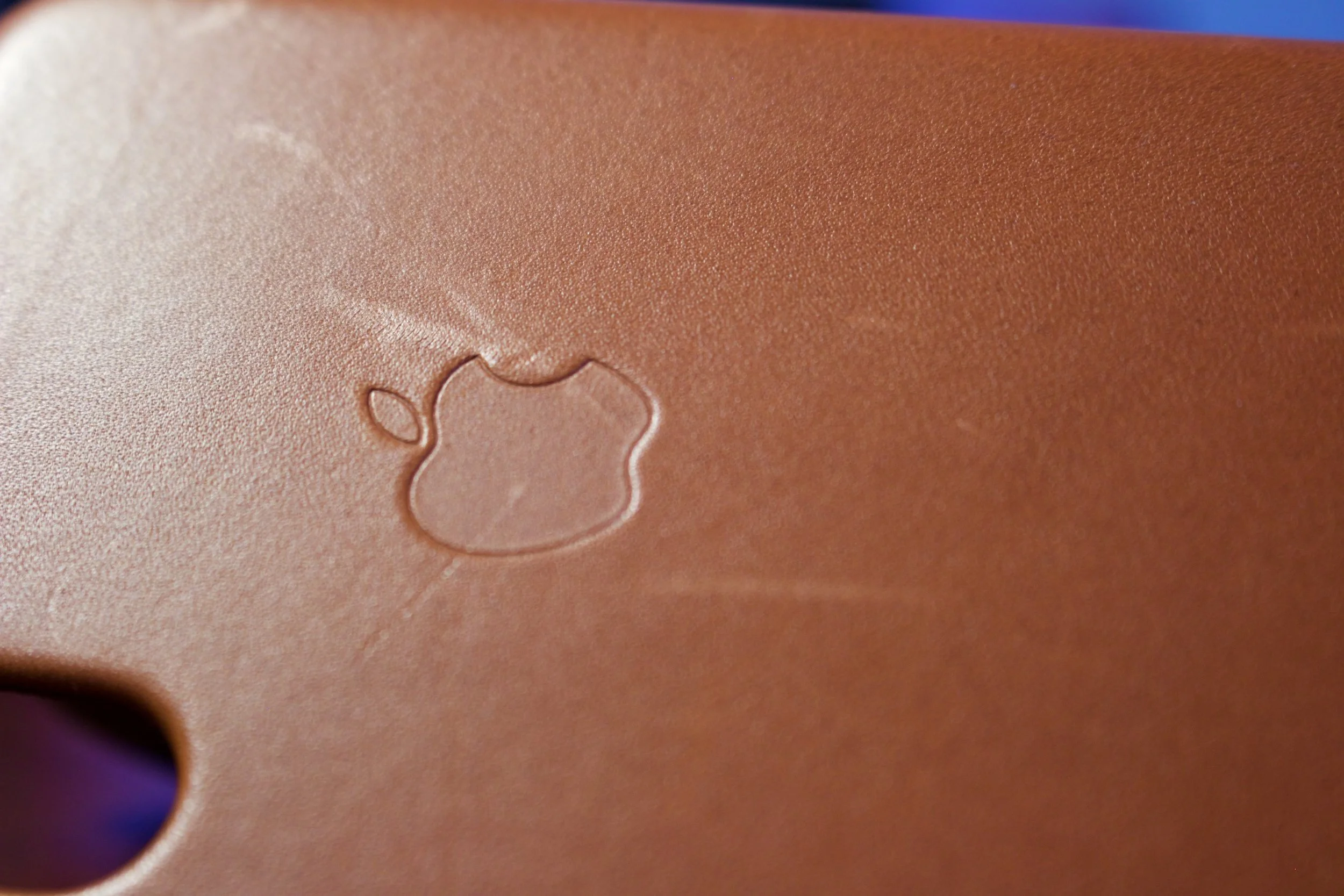
One month later, I've dropped my phone a few times. Never on concrete, but a few times on the hard floor at work. It's unscathed. The leather case itself was initially a scuff magnet. The slightest brush with a fingernail or jean rivet left scratches. But, it self-heals. The more I handled it the more the oils from my skin darkened and smoothed it, and scratches disappeared.
Initially the case was quite rigid and slick. After two weeks it become grippier and soft. I think the amount of grip is just right, now. It's developed a patina, darkening around the edges, and it looks great, like a worn saddle. Originally it was a uniform caramel color, but I prefer the darker brown.
Here's a few pics. If you return to my original post, you can compare them versus new:


A Case for Cases
Well, I should probably put a case on my $1000 glass wet bar of soap.
Yes, I bought a thousand dollar animoji machine. It's sleek, it's beautiful. It's made of glass. It's a wet bar of soap. That's the only way to describe holding an iPhone X. The first day I had it I didn't have a case. Every time I took it gingerly out of my pocket I looked like Jeremy Renner in the Hurt Locker handling live ordinance.
Granted, my past few iPhones have had a case. My 4S had a leather case which looked like old sneakers after a few months. My 6S had a silicone case. The question was which direction to go for the X.
I ended up buying both, getting the Cosmos Blue Apple silicone case and Saddle Brown Apple Leather case. I found a few YouTube videos reviewing each individually, but thought I'd give me own thoughts comparing the two.
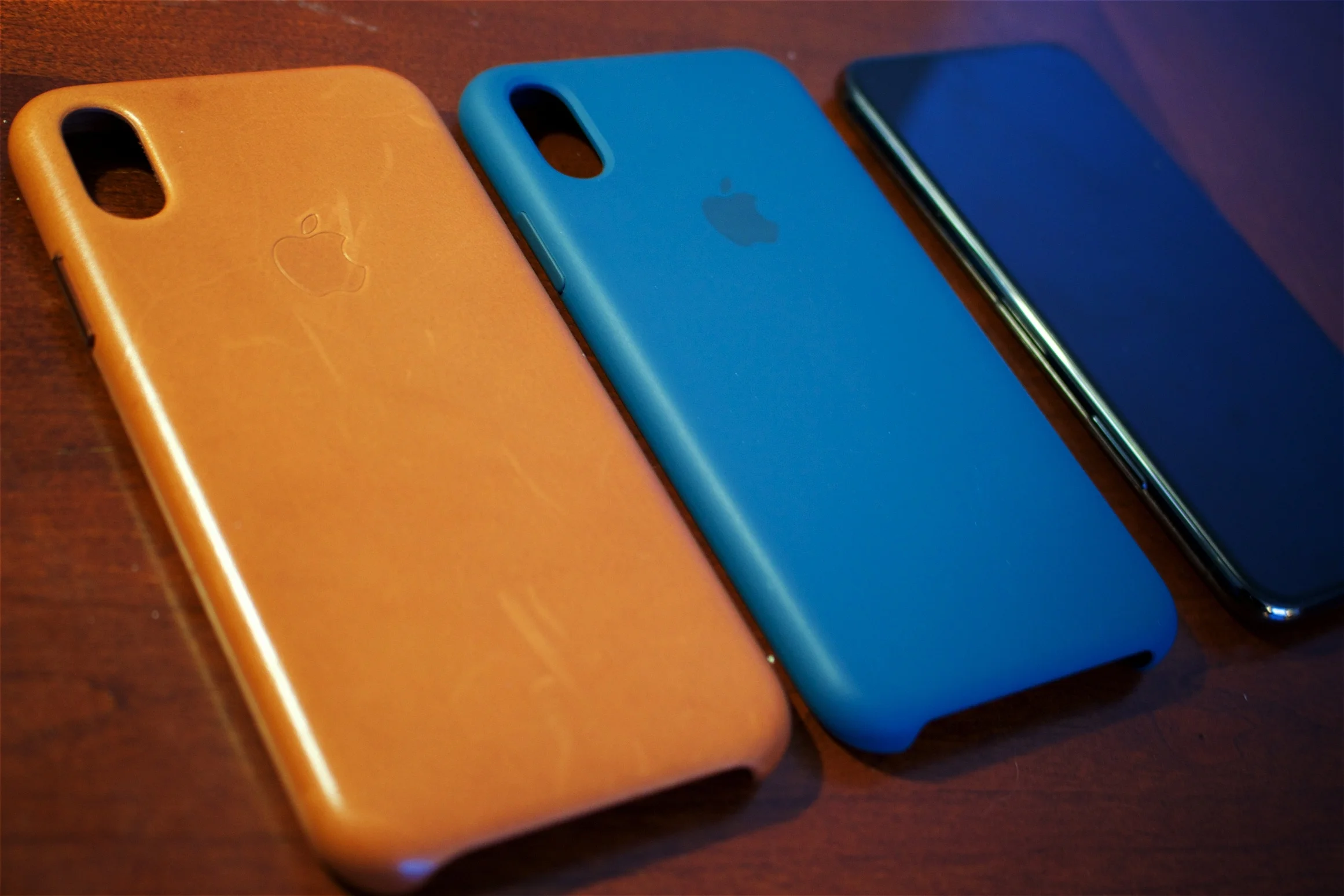
Drop Protection
First, you will not find any drop protection claims anywhere for either of these cases. I can say that I dropped my 6S onto concrete twice with a silicone case without damage. Having both the leather and silicone case, I suspect the silicone one offers better cushioning, just based on the fact that it is soft and the leather case is fairly hard. They seem mainly designed to avoid scuffs and scratches, with a small amount of drop protection.
There are many other heavy-duty cases rated for six or ten-foot drops. I prefer smaller, non-bulky cases with a little bit of padding.
Grip/Feel
The Cosmos Blue silicone case feels slightly powdery and soft. Other than that, it is very grippy.
The Saddle Brown leather case feels very hard and slick. At first it was very slick. After a week it softened slightly, improving its grip.
In terms of touch, I prefer the leather case. Although it is slippery, it just feels great in your hand. Leather also slides out of my pocket easier. Silicone pulls up lint from my pant pocket.
Buttons/Shape/Access
The leather case comes with copper-colored metal power/volume buttons which have a clicky feel. The silicone case has fixed silicone buttons which have a soft feeling.
The access hole for the mute button is smaller on the leather case. It's difficult to fit my thumb into the notch and flick the switch. The silicone case doesn't have this issue.
The bottom of the leather case is more open than than the silicone case. I suspect the silicone case offers slightly more bottom protection. As an aside, I like that the bottom is open, because I constantly swipe up (it's the new home key) and it's nice not to hit the case with my thumb.
The camera cutout on the blue silicone case has a nice chamfer. The leather case does not, although the leather is raised to protect the camera.
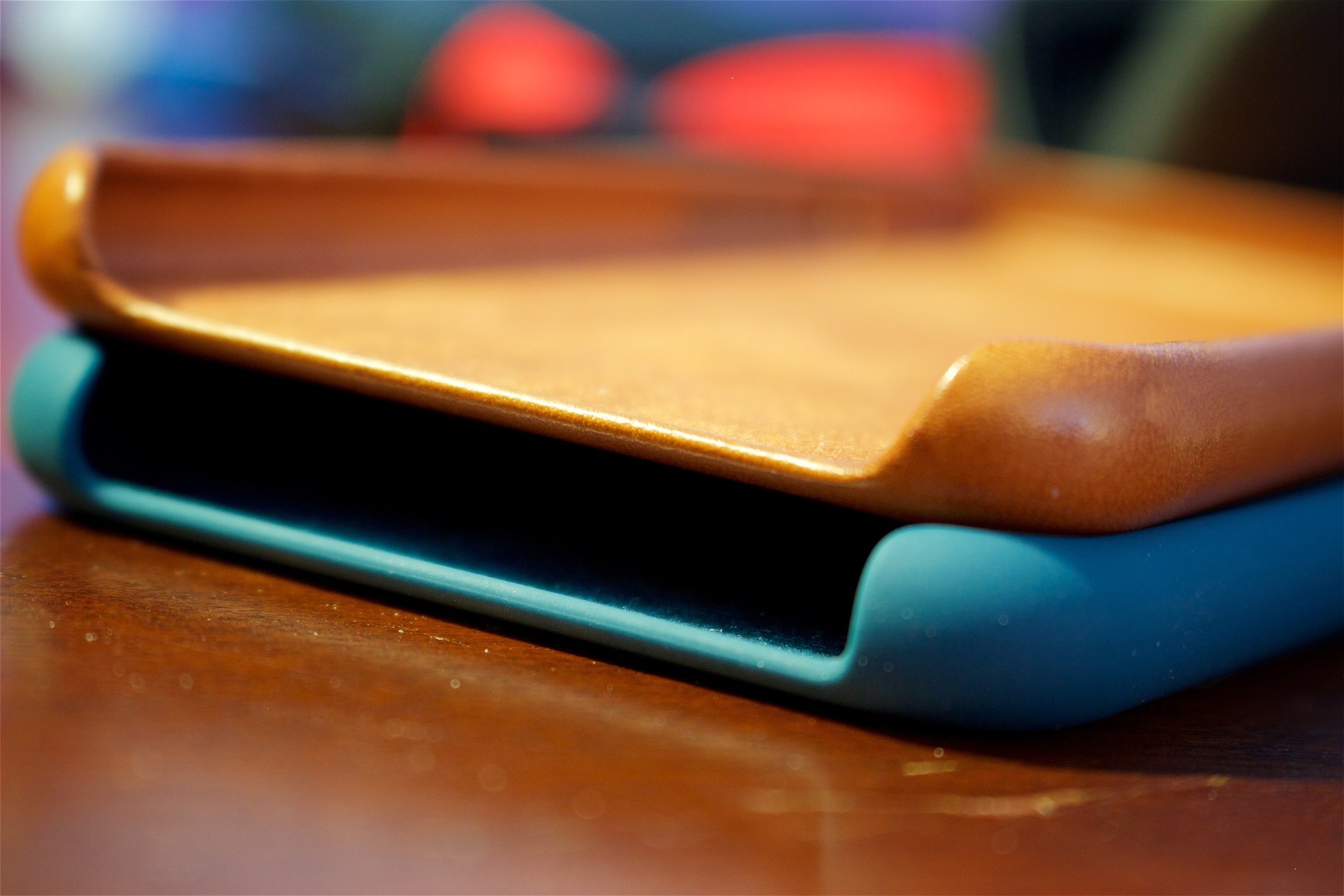
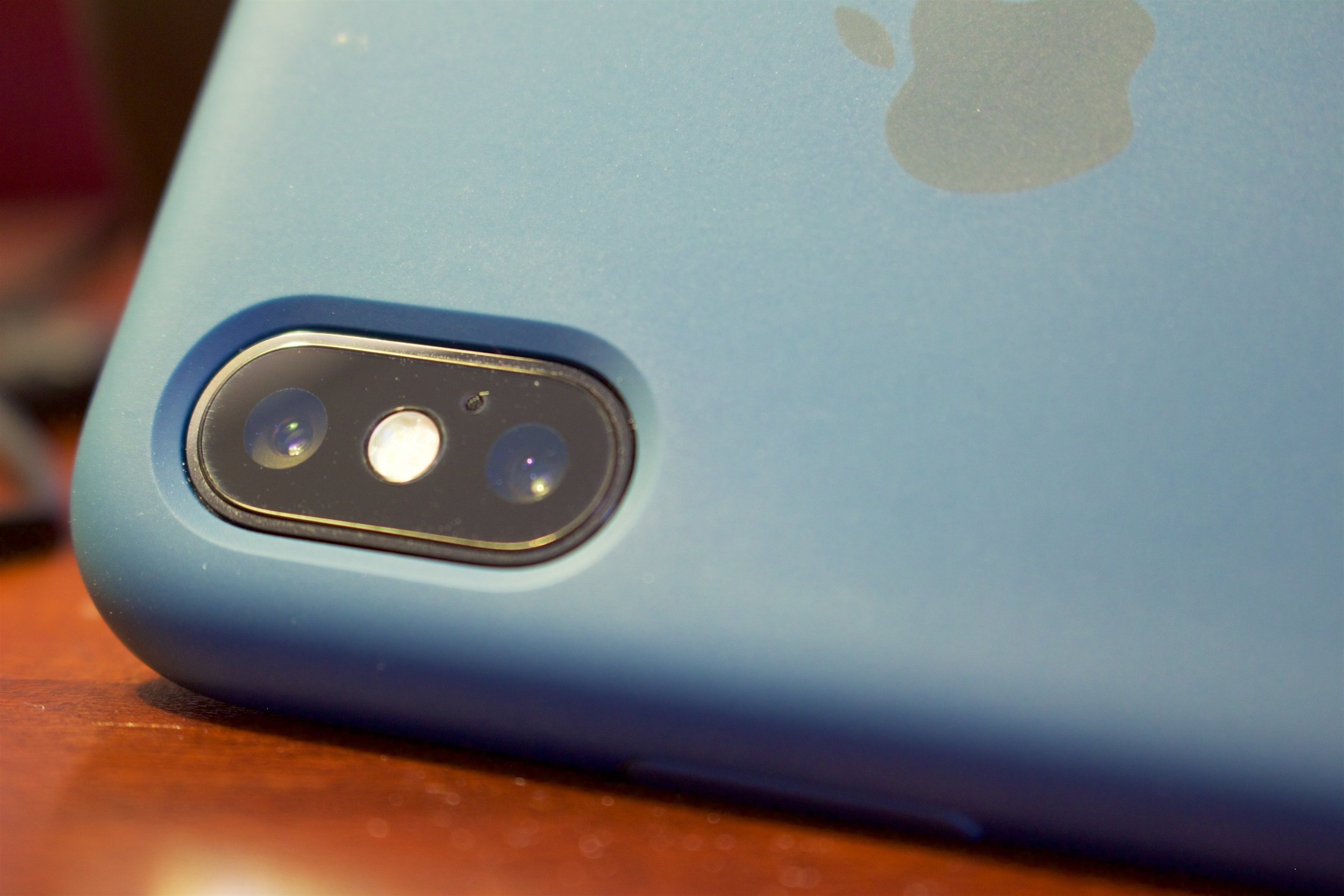
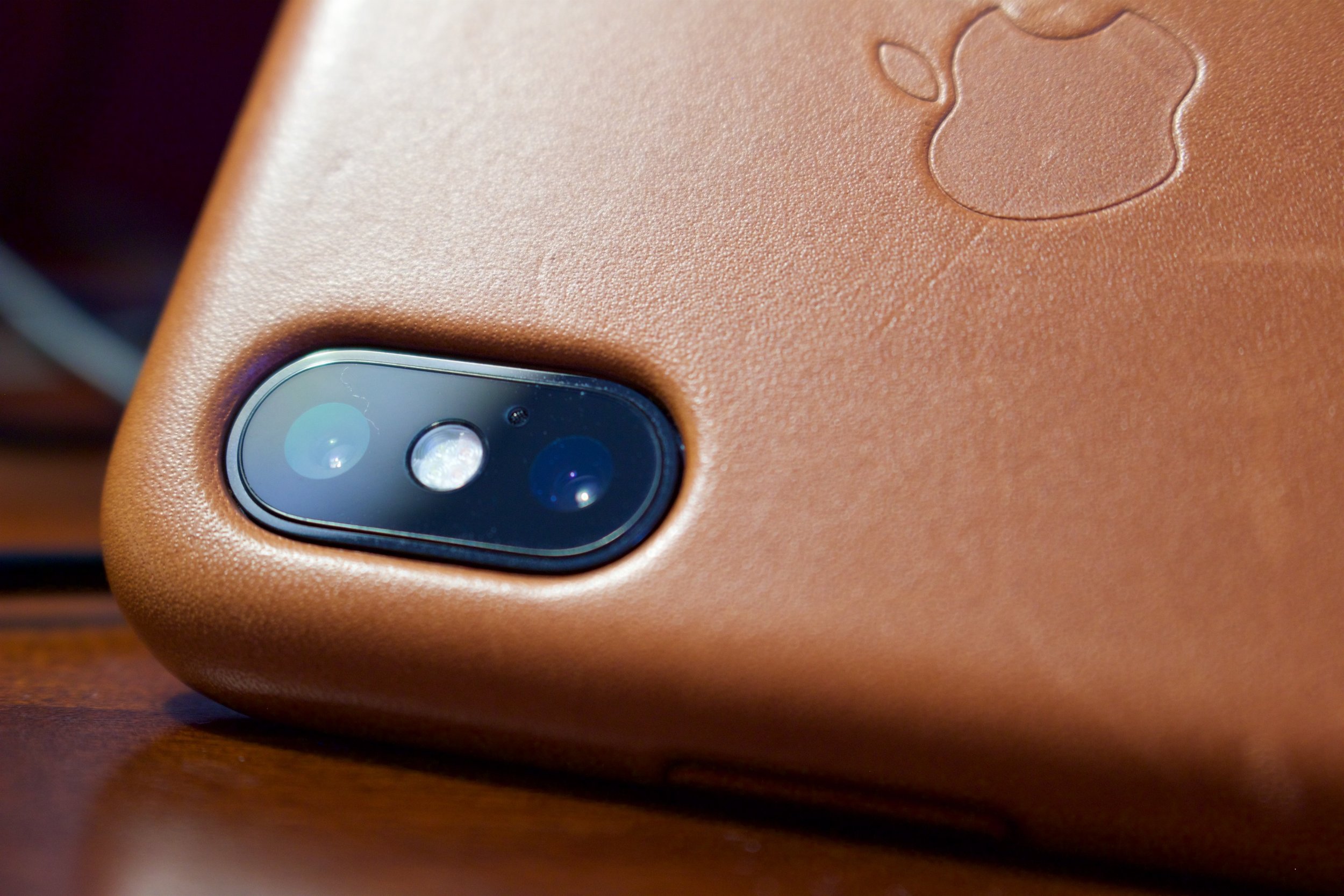
Durability
The silicone case looks the same after time. It's fairly impervious to stains or color change. When it finally wears, it becomes shiny and hard along edges where the underlying plastic is exposed.
The leather case quickly (within a few days) starts to darken. It scratches if you look at it the wrong way. After four days mine had scuffs from fingernails and jean rivets. The case darkens from skin oil, so just touching it will gradually change its color. This isn't necessarily a bad thing for saddle brown, which goes from a caramel color to a leather-bound book appearance. When I set it down on a table at lunch, it picked up a fleck of food with oil, adding a permanent dark spot. Note my experience with other colors of leather cases was different. When I had a blue case, it darkened along all the edges, turning indigo blue. It looked stained, like an old tennis shoe.
Appearance
At two weeks, there is no contest. The leather case looks much more premium than the silicone. I like how the leather is darkening.
Verdict
If I'm going in the field where there's a chance of dropping my phone, I'll put on the silicone case.
For day-to-day use, I'll use the leather case. It looks great and feels nice to hold.


Yes, I bought a $1000 animoji machine
After a week with my iPhone X, I give my random opinions.
I'm a nerd. This should come as no surprise. I bought the first iPhone when it launched in 2007. At first Apple didn't even have an app store - what came with the phone was your only software. There was no front-facing camera and no video capability, It was, however, an awesome mp3 player/internet surfer/phone. And I admit, it was a bit fun when I brought it to work that first time, a crowd of curious co-workers wanting to see the magical gadget.
Ten years later when the iPhone X launched I waffled. It's expensive. It's glass. It swaps out one perfectly fine security feature with another. But that beautiful edge-to-edge OLED screen was compelling, quenching my desire to have an phablet-sized screen in a standard-sized phone. So, last week I reached a tipping point and bought one.
In my mind, I envisioned walking into the AT&T store, saying, "I would like an iPhone X, good sir," handing over my briefcase filled with cash, and watching the clerk slap the box into my eager hand.

The AT&T store's response
Of course, AT&T will not let you buy the phone outright, but instead insists on you signing up for AT&T Next. So, a jillion signatures and forty-minutes later, I finally left with my 64 gb Space Gray iPhone X.
Here's my thoughts after using it for a week:
- First, I love it. Not sure why I waffled so long.

- It's a little taller, wider and heavier than my old 6s. When I hold it with one hand, I hold it differently, resting my pinky underneath the bottom for support. Holding it this way for a while is tiring. It feels much more natural to hold the phone with my left hand while my right does the gestures.
- Those beautiful stainless steel and glass curves simultaneously feel great in your hand and like a wet bar of soap. Sadly, a case is necessary.
- The new gestures are awesome and I do not miss the home button at all. In general, you swipe up instead of clicking the home button, and you swipe up and pause to enter multi-tasking. In multi-tasking you can still fling apps off screen to close them.
- Face ID works so well that I often forget it exists. I'm used to apps prompting me for touch ID when I open them, but now they just unlock without asking for anything.
- The rear camera takes amazing pictures in portrait mode.
- The front camera takes weird pictures in portrait mode. They're fine in regular mode, but the stage/contour lighting produced images which looked like bad Photoshopping.

My first selfie with the iPhone X front portrait camera
- The edge-to-edge screen looks great. You can notice the OLED difference if you set the background to black (in which case, it's pitch black, and icons almost have a 3D effect). In terms of color and clarity, though, it doesn't look much different than a regular iPhone.
- In portrait mode, I ignore the notch. In landscape mode, the notch is a little weird, but not a big deal.
- Although I'm not sure if I'll use animoji, every single person I showed them to was entranced and played with them, laughing.
A few quirks:
- When reading a webpage, it's typical to scroll up with your thumb and pause while you read new content. But this is the same gesture to launch multi-tasking.
- The power-button-that's-sometimes-the-power button is odd. It's now a multi-function button that does everything from opening Siri to using Apple Pay. You can turn the phone on with it, but turning the phone off requires pressing it and the volume button.
- At work, I lay my phone flat beside my computer. To trigger face ID, I need to lean into the phone a bit. By default, all notifications on the lock screen are masked (they just show the app and something like "new message") until the phone sees you. It's kind of cool that it's a "for your eyes only" feature, but I turned it off because I got tired of constantly leaning in to see my emails.
- Although the phone displays a remaining battery graphic, the battery percentage is hidden in the control center. I miss the battery percentage.
- Surprisingly, the phone comes with wired headphones which have a lightning connector, but the headphones no longer include the plastic storage case.
But, overall it's a great phone, and I'm glad I upgraded from my 6S to it.


Books Butterfly Promo Results
My first promotion with Books Butterfly is nearly complete. Here are my results..
Last month I set 43 Seconds perma-free on Amazon. Like many indie authors, I followed the strategy of offering the first-in-series as free to attract new series readers. Since doing that, I've received a trickle of daily downloads for 43 Seconds.

I've read about Books Butterfly guaranteed promos, which guarantee a specific number of downloads, and decided to give them a try. Overall, I'm happy with the results. Here's how it played out:
1/23/18 - I requested the Silver Eagle promotion package ($50) with a guaranteed 500 book download via Books Butterfly online signup form. The site had a Stripe popup which had me pay $50 at the time of signup via credit card. On the form, I could enter my requested ad date. I just entered 'first available' since my book is permafree, and I indicated the book is permafree. I received a confirmation mail the same day from Book Butterfly stating my request was received and someone would get back to me within a few days.
1/26/18 - I noticed a spike in downloads for 43 Seconds. I hadn't heard anything yet from Books Butterfly, but assumed they must have started running the ad.
1/27/18 - I received a confirmation email from Books Butterfly that my ad started running on 1/26 and would continue until 2/6 on Kindle, Nook, Apple, and Kobo. There were many terms and disclaimers in the email including a one-time exception to guarantee downloads for a short story. Books Butterfly offers a prorated refund in the event they don't meet the minimum download promise (the refund is in store credit).
Here's the results of the promo (as of 2/6 @ 6 pm)
Downloads: 473 (Kindle 415 / Apple 49, Nook 9, Kobo 0)
Paid Sales (other titles): 7
New Reviews/Rating during the ad period: 4 (Kindle 2 / Apple 0 Nook 0, Kobo 0, Goodreads 2)
In general, downloads per day were ~60 at the start of the promo and ~30 the second week. Note this download rate was sufficient to keep 43 Seconds in the top ten free books for its category, which was helpful. Its best spot was #4 on the Sci-fi & Fantasy 90 Minute Kindle Short Reads list.
Overall, a good result. I've easily spent $20 on Amazon promos which yielded a single 99 cent sale, so $50 for 500 downloads and 7 sales is a good value. The ad did not pay for itself in terms of sales, but I sell 99 cent short stories and no ad has ever paid for itself (I need to sell higher-priced books before ads become viable). For now, the ads are about building a customer base for the series.
I should note that book totals for the guaranteed download promise should be calculated through 2/7, so I don't have the final tally today as of 2/6. 473 is close to 500, and it's entirely possible I will pass 500 downloads by the end of 2/7. Either way, I'm happy with the promo result.
Lastly, if you were one of the readers who left a review or rating - thank you! You can see that out of the 415 Kindle downloads, 2 left reviews, so this is 0.5%. You are in the top half-of-one percent and you're awesome - thanks again!
EDIT: The final download total (Kindle, Apple, B&N, Kobo) at the end of 2/7 was 506
If you enjoy sci-fi stories about pilots, why not get your free copy of my short story, 43 Seconds, on Amazon Kindle? It’s part of the Hayden’s World series, which is about a pilot willing to risk everything for a shot at the stars.

Some Completely Unnecessary Math
The title says it all. This is what happens when I have a day off.
When I read Andy Weir's The Martian, I realized there was a whole genre of science fiction that took the science part seriously. It's interesting that the original genre of science fiction was just that - fiction extrapolated from science. Sure, I know there's a hard science fiction genre, but Weir started at Bill-Nye-Science-Guy-level and turned it up to eleven.
Even if you're not a hard science fiction fan, there's the puzzle appeal. You'll find it in movies like Apollo 13. Everyone remembers the square-peg-in-a-round-hole brainstorming scene. Or MacGyver, a fellow who literally saved himself and everyone else each episode with science.
Now that it's Christmas, it makes me think of the meme where someone calculates how fast Santa's sleigh would need to go to traverse the world overnight, and what would happen if it did. There's some nerdiness in us all.
I'd read that Weir actually calculated the orbital mechanics of the Hermes in the Martian. I remember thinking he could have just said the NASA guys worked it out in the story and I would've taken his word for it, but, at the same time, it's the sort of thing I do in my stories. If it takes twenty-six days for the Aristarchus to get from the outer system to Earth, I've actually done the math. At times it's been my bane. Simple things like flying from Saturn to Cassini Station (just outside Saturn's rings) in Erebus takes hours of flight time. Space is big. Saturn is really big.
Recently I was watching one of my favorite sci-fi movies of all time, Star Trek II: The Wrath of Khan. I can't say how many times I've seen it. At the end there's the dramatic escape when Khan activates the Genesis device and Kirk says, "Scotty, I need warp speed in three minutes or we're all dead!". Mid-scene we hear that the Enterprise's distance to the Reliant is 4000 km. Sulu says, "We're not going to make it, are we?". David shakes his head. Great stuff.
So, here's where the nerd in me perks up. I know the Enterprise has been shot up and is operating under impulse engines or thrusters. However, it's always struck me that 4000 km is not very far for a starship. If you pay attention, Kirk provides a time and distance in the clip:
Kirk: "Time?"
Saavik: "Three minutes, thirty seconds."
Kirk: "Distance from Reliant?"
Chekov: "Four thousand kilometers."
I'm going to make an assumption the Enterprise was accelerating that entire time. Which would make sense if they're using thrusters. I have no idea how Star Trek's impulse drive works, but if it's a space-bending-continuous-speed thingy, then the math is just distance over time:
4000 km / 3 minutes 30 seconds = 19 kilometers per second
This is fast, but slower than most asteroids. As an aside, not even Star Trek seems to know how its impulse drive works. In some movies they use impulse drive while in space dock, which, you know, seems like a bad idea.
Now if the Enterprise is accelerating at a constant rate from a standstill, the math is a little harder:
distance = 1/2 acceleration * time (squared)
If you solve for acceleration, the Enterprise is accelerating at 18 g
Presumably Star Trek's inertial dampeners keep everyone from getting squished. On the plus side, this is faster than I thought. 18 g acceleration will get you from Earth to the Sun in a speedy 16 hours. Unfortunately the (albeit damaged) impulse drive doesn't work out so well in the long run in this case. Traveling a continuous 19 kps will take 91 days to get from Earth to the Sun. So, stick with the thrusters.
Anyway, this is what happens when I have a day off. Enjoy the geekiness.
Pulp Fiction
Serial fiction is an itch I needed to scratch with my keyboard.
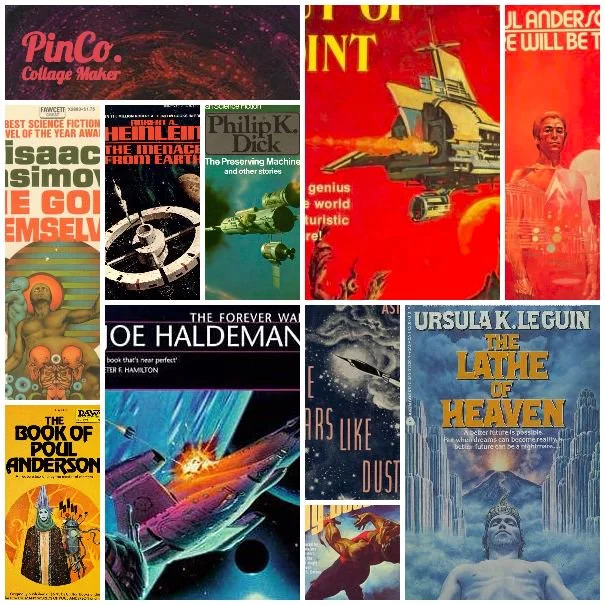
If you've read 43 Seconds or Erebus, you'll know James has nostalgia for the golden days. His dreams are an extension of my own. Instead of the golden days of aviation, however, I dream about the pulpy days of science fiction. Book covers painted in gauche with paint-streaked rocket ships bisecting star fields, like these:

Like 'em? Check out my collection on Pinterest.
I also love the concept of the serial, tuning in next week or getting the next issue to see what befalls our hero. It's really the structure for most modern sci-fi television, whether you're watching Dr. Who or Star Trek. Bite-sized stories consumed sequentially, starring the same characters, focusing sometimes on the star, sometimes on the co-stars.
When I conceived Hayden's World, it was a full-fledged book. I thought the voyage to get to that point, however, was its own exciting story. I'd been searching for Kindle short reads to consume each night in bed - ninety-nine cent stories I could read in under an hour. To my surprise, there was a shortage of them. It was an itch which needed to be scratched, and I decided to tackle it with my keyboard.
Publishing sci-fi shorts on Kindle is surprisingly difficult. I think people are more likely to try a novel from an unknown author than a short story. It's nearly impossible to advertise ninety-nine cent fiction without losing money. I've found the most effective paid promotion is simply to buy the books from Amazon and give them away (via Amazon's Giveaway program). Kindle Select allows me to set the price to free for up to five days every three months. and this moves two hundred copies if I pay for basic advertising. Recently I had a friend ask if there was good money in my Kindle sales. I told him I could buy one nice dinner-for-two yearly from them.
This quote from author Palessa on Nicolas C. Rossis blog sums it up perfectly:
On the author side, I decided to go more for brand awareness than book sales, because if I’ve learned anything in this whole independent author journey, it’s that obscurity is the force we are all fighting against.
The main challenge hasn't been one star reviews. It's publishing to the abyss. It takes money and effort to keep your needle in the haystack from sifting to the bottom of the pile. And, you've got company there. You can deduce this fairly quickly from your Kindle stats. When your book bottoms out in sales, it moves to a sales rank of around three million (meaning, there are three million books in the pool, and you are at the bottom). When you sell just one copy, your rank jumps to one hundred thousand. This means those 2.9 million other souls are selling no copies.
I'll admit, it's daunting. I was an artist before I was a writer. Both are creative endeavors. Art is easier, though. It's visual. When you post a newly completed piece online, you immediately get feedback. People can assess its merit in the few seconds it takes to glance at it, and respond. They can share the image socially. Writing, though, is different. There's a commitment to read a story, and then it takes more than a Facebook like to give feedback.
I'm four stories deep now in the Hayden's World series and excited about the subplots developing. There's plenty to explore, especially with James's discovery in Erebus, or the lack of closure with the pirates in Aero One. Looking forward to seeing what happens next with our heroes.
As always, you can help with your feedback. Leaving a rating on Amazon or Goodreads really helps, or just a comment on this blog if you like a story or have questions about what's next. I love to hear from readers, so drop me a line.
Thanks!

If it's free it's for me
Get 43 Seconds for free from your favorite retailer: https://www.books2read.com/43seconds
43 Seconds is FREE on most major vendor's sites. You can get it on Apple iBooks, Barnes & Noble, Kobo, Scribd, and several others. On Amazon Kindle it's still 99 cents, but hopefully Amazon will price match it in the near future. Click here to get your copy: https://www.books2read.com/43seconds

Grammar Police
An engineer slowly learns the rules of grammar.
I admit, the math section of the SATs was easier for me than the reading section, which is probably why I became an engineer. Despite that, I still really enjoy Weird Al's Word Crimes:
In keeping in theme with my recent post discussing what I've learned in my first year of self-publishing, I thought I'd mention a few grammar confusions I needed to work through:
Since
Apparently I've been using the word "since" incorrectly my entire life. Case in point:
Since I'm here, I may as well have some french fries.
I should be using it like Kelly Clarkson:
Since you been gone, I can breathe for the first time.
Granted, "since you been gone" isn't the best grammatical example, but hey.
"Since" references a period of time. I've been waiting here since nine o'clock. Or, Since learning that I use "since" incorrectly, I need to sing that Kelly Clarkson song to remember how to use it.
Which/That
Aaargh. Quick quiz - which is correct:
Cut the wire which is red
Cut the wire that is red
There's a better explanation detailing restrictive clauses, but I find it's easiest to replace the word "which" with "which happens to be". If the sentence still makes sense and has the same meaning, you're good.
Cut the wire, which happens to be red. It doesn't really matter that it's red. Just pointing that out for people who like the color red. Pretty!
Cut the wire that is red. There's also a black wire. Please don't cut the black...oh my God, you're not even listening to me! Give me those wire cutters!
Feeling Possessive
Sure, it's been several hundred years since I went to elementary school and my memory may be a little foggy, but I distinctly remember the rule to use an apostrophe s unless the word already ended in s, in which case just use an apostrophe. Granted, that was back in Arthurian days when we spelled town with an e.
It seems I'm supposed to use an apostrophe s for singular nouns (regardless of their ending letter) and apostrophe for plural nouns that end in s. Actually, if you Google it you'll find the Internet's definitive opinion on the matter is:
- Apostrophe s for singular nouns; apostrophe for plurals ending in s
- Apostrophe s for nouns that don't end in s; apostrophe for words that do
- Apostrophe s if you speak the s; apostrophe if you don't
- These can't all be true, but it doesn't matter, just be consistent
- Why do we even have language at all. Let's just grunt and point.
- Hey, there's a new Cinemasins videos. Wait, what was I Googling again?
Anyway, in my stories you'll see:
James's
and not
James'
That is, unless a Riggs malfunction creates an army of duplicate James, and they all collectively own something.
As an aside, why English has chosen the possessive form of "it" to be "its" is mind boggling. More accurately, it's mind boggling. I realize that "it's" has been claimed as the contraction for "it is", but there's no reason you can't contract "to be" onto any noun, as in "Hey, Bob, cat's gone missing again" or "That grammar rule's silly."
Okay, that's enough pearls for today. Back to writing.

What I've Learned in One Year of Self-Publishing
June 12th, 2016, I uploaded 43 Seconds to Kindle Direct Publishing and clicked the submit button. One hour later it was live. Since then, I've published Signal Loss, Aero One, Hayden's World Shorts, and Erebus. When I started, I recall reading many self-publisher's blog posts about how their journey unfurled. I thought I'd share mine after the first year.
June 12th, 2016, I uploaded 43 Seconds to Kindle Direct Publishing and clicked the submit button. One hour later it was live. Since then, I've published Signal Loss, Aero One, Hayden's World Shorts, and Erebus. When I started, I recall reading many self-publisher's blog posts about how their journey unfurled. I thought I'd share mine after the first year.
Writing Craft
There are endless books on story structure, plot, characters, grammar, and dialogue. I devoured them. James Scott Bell's and Marcy Kennedy's series are very helpful. By far, Self Editing for Fiction Writers is essential and probably should be required reading for self-publishers. It addresses many of the common problems newer writers face.
Here’s a few things I've needed to focus on as a newer writer:
Passive Voice (the bane of newer writers):
Long ago I wrote a story titled "Wraith's Dance" and submitted it to Weird Tales. I received a refusal letter, but was pleasantly surprised that it included a constructive critique from the editor. He liked the story, but the deal breaker was its passive voice. Keep writing, he encouraged.
When we speak, we're used to telling a story using the word "was" to indicate a transient action:
He was running down the hall when the bell rang.
Ditching the word 'was' and just using the actual verbs ran or rang changes the sentence from a state (was running) to an active verb (he ran, the bell rang):
He ran down the hall as the bell rang.
The bell rang as he ran down the hall.
Both are more engaging than "he was running down the hall".
I recommend using your word processor's Find/Replace to locate every use of "was" and determine if it's needed. I found this was littered throughout my writing.
A little less common, but even worse, is using was to put the recipient of the action first:
The martini was splashed in his face by Jane.
Much better to write:
Jane splashed the martini in his face.
I can't recall which writing book listed the acronym R.U.E, but it definitely applied to my early work. R.U.E. is "resist the urge to explain". The biggest offender for me was "to", as in:
He opened the door to search for the axe murderer.
Better to let the reader figure it out based on the character's actions:
His pulse raced as he reached for the door knob. He had to find Eugene before he killed again.
Seriously, it was everywhere in my writing. To do this, to do that. Readers like watching a character and trying to deduce what they're up to.
Tight Writing and Pacing
As you'd guess, don't use a hundred words to say something best described with a dozen. I found my biggest offender was the word "of":
Pools of radiant light filled the room.
Flowery, but better to say:
Radiant pools filled the room.
Right? Radiant is a stronger word to start the sentence and doesn't require mental gymnastics to extract the modifier between the object and verb.
Pacing's a little harder to pin down. It's easy when writing sci-fi to get swept away in descriptions, but endless description is boring and endless action is tiresome. You need to constantly mix-up description, actions and dialogue to keep things moving. The other thing I'll say is that it's often better to suggest descriptions with a few well-chosen words. For instance, the waves bled with fading sunlight conjures a complete mental image in six words.
When I wrote Aero One, the opening paragraphs were very focused on Jia's senses and confusion. The high level or detail didn't match the urgency of her situation, though. I self-edited it down to:
Thoughts spark and fizzle in an overlapping jumble of competing primal urges. Air. She needs air.
Head Hopping
Phew! This one's tough. We've grown up watching television and movies which constantly cut between different character's perspectives. Some are better than others at keeping you in the main character's head.
For example, the camera frames a close-up of Bob's expression as he looks down at a letter. Next, it cuts to what Bob reads in the letter. Off-screen, we hear the clinking glasses as Sandy opens the kitchen's liquor cabinet. Great!
More typically we see Bob reading a letter followed by a camera cut to Sandy in the kitchen. Bob can't see Sandy from where he's standing in the study, but we get to see her pouring the poison into his brandy.
When I started writing I mimicked this cinematic approach. There's no rule that says you can't do that, just keep in mind that in this case you're writing as a detached omniscient viewer and your reader will have the same experience. This weighed on my mind as I wrote my recent story Erebus. Staying with Sarah's perspective meant the reader didn't know what happened to James. If this were a tv episode, it would have cut simply to what James was doing while Sarah searched for him.
Note this doesn't mean that you can't change character point-of-views using line or chapter breaks. Just keep in mind there are pros and cons to POV changes.
Dialogue
The simplest rule is "he said/she said".
"Yup, we're all going to die," Hitoshi said.
I remember getting confused and sometimes typing it backwards:
"Yup, we're all going to die," said Hitoshi.
But that puts the verb before the object.
Even better, eliminate the dialogue tag with stage direction:
Hitoshi facepalmed and shook his head. "Yup, we're all going to die."
Formatting Your Book/Creating Cover Art
Scrivener is invaluable for organizing and writing your story. It's project management software for writers.

Scrivener project file for Erebus
If you have enough patience, you can produce well-formatted books directly out of Scrivener. I did not, so I purchased Vellum. Vellum's expensive, but produces beautiful books.

Vellum file for Erebus. Very easy to create a professional ebook or paperback.
Canva is the easiest way to create a quick book cover online, and it's cheap. Alternatively, if you have some design skills you can purchase stock photos (make sure you select the right license) and assemble your own cover in Photoshop.

Paperback cover design in Photoshop for Hayden's World Shorts. Background planet is a licensed Adobe stock photo.
If you have artistic skills, you can use Adobe Illustrator or Photoshop to create custom artwork. For Aero One, I designed the cover from scratch. The nice thing about doing all of the artwork yourself is that there is no licensing:

Pro tip when doing your own design in Illustrator: also design social media graphics, like the cluster on the left of Facebook and Twitter cards designed for ads and free promotions.
Lastly, you can also outsource it to a designer via a site like 99 designs.
Here's how I created the cover for 43 Seconds:
- The background's warp effect is a licensed Adobe stock photo
- The spaceship is a 3D model created in the free modeling software, Blender
- The foreground text is a layer in Photoshop.
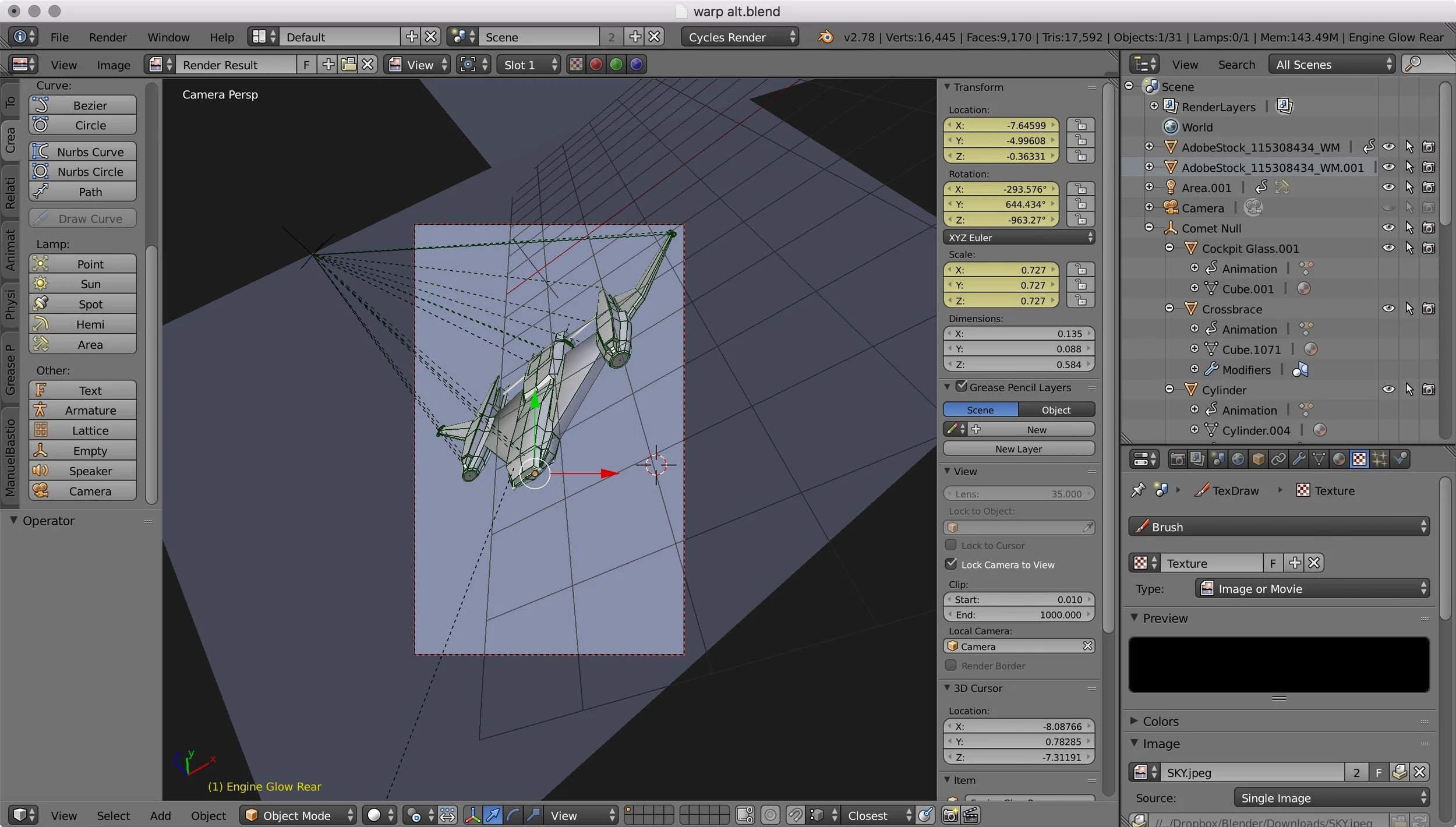
Blender 3d model of Bernard's Beauty for 43 Seconds

Photoshop composite of background art (generated in Blender) with foreground text
Reviews and Sales
And now the bad news. When I started I feared I would post my book and get peppered with one-star reviews. The reality is that next-to-no-one will see your book, and out of those that do, one-in-a-thousand will leave a review. Getting peppered with negative reviews is an upgrade to where you actually start. I've had my best luck getting reviews with Amazon Giveaways. I do use KDP free days, but they never generate reviews.
Regarding sales, my annual book sales can probably buy me a single, nice dinner. If you're looking to make money, I suggest trying to sell to magazines. If you get 6 cents per word for a 6000 word story like 43 Seconds, you'll make $360. Maybe I'll try writing some non-Hayden's World stories and submit those to magazines.
Advertising
Amazon ads do work, but they are not cost effective for 99 cent books (unless you can upsell a series). I typically land in the 40 to 50 cents-per-click range and need ten clicks to get one sale. Four to five dollars to sell a 99 cent book isn't a sound business model. Giveaways work better because four to five dollars gets you four to five sales. Without ads or giveaways, however, my books fall into obscurity. When using ads, Product Ads work much better than Keyword Ads in generating actual sales, probably because they are better targeted.

In the top chart, the blue bars represent free books purchased and the orange bars are paid books sold. The bottom chart shows pages read via Kindle Unlimited book borrows. In December 2016, I learned how to promote my Kindle free days more effectively and started using Amazon ads.
Spamming buy-my-book on twitter is counter-productive and will cost you followers. Twitter is for sharing content. I do recommend posting snippets of your good writing, especially if they fit the day's theme (SciFiFri for example), or if they're works-in-progress and fit the #amwriting tag.
Wrap-up
I feel like I've learned a lot this first year. I've taught myself Scrivener, Photoshop, Illustrator, Blender, Vellum, and KDP. Getting an occasional review from an excited reader makes my day. Writing in series for the Hayden's World stories has been challenging because each story needs to be independent, and each time I finish a work I have this self-doubt phase of wondering how I'll come up with something new. But, the stories keep churning out, and they're getting longer and more complex:
- 43 Seconds - 6000 words
- Signal Loss - 9000 words
- Aero One - 9300 words
- Erebus - 17,000 words
So, marching into year two and seeing where my keyboard takes me.
NEW RELEASE: Erebus - now available on Amazon
All of your favorite characters are back - James, Ananke, William, and Hitoshi - with a few new ones in this exciting follow-up to 43 Seconds and Silver-Side Up. Bernard's Beauty flies again, but so does the newest Riggs ship, Gossamer Goose. Get the new Hayden's World novelette, Erebus, on Amazon now for 99 cents.


Sneak Peek - Erebus
A few sneak peeks at what I'm currently writing.
In "Silver-Side Up", James gives us a sneak peek at the next Riggs ship, Gossamer Goose, and mentions Sarah is slated to be Gossamer's pilot. You'll recall Sarah appears at the end of "43 Seconds" as the pilot on stand-by near Mars if anything went wrong.
I've been writing Sarah's story, and thought I'd share a few snippets from it. Let me know your thoughts:
Sarah pushes the Pintail’s flight stick forward and the aquamarine sky rolls away. Below, the cloud deck is an impossible swirl of cinnamon and gold with pockets of flickering lightning. Thunder rumbles in bursts, its audio out of sync with the light show. Through the cockpit windows great banded rings fade into the horizon and the scale of it is almost too much to take in at once. Motion catches her eye as a silver glimmer carves a vapor trail across the sky, alternating red and green strobes pulsing from its wings. It changes course, the vapor trail bending behind it, then corkscrews a white spiral before matching her altitude. Saturn’s moons are an audience of bright stars behind it.
“Well, now you’re just showing off,” Sarah says to her helmet mic.
The stars behind Bernard’s Beauty swirl to an invisible periphery as if pushed by a great unseen force. Each brightens and blues. In the blink of an eye the ship collapses into the nothingness of space, the stars rotating back into place in its wake.
Transmission Four: +9 days/+21 hours
Sarah’s having lunch with her mother. Gaige sits beside her, happy to be reunited after her two-week trip. Sarah’s mother has been a saint taking care of him each time she’s been away.
In James’s video the cabin lights are dimmed and he’s weightless in a wall-mounted sleeping bag, his arms floating in front of him. There’s just not enough room in Bernard’s for a separate sleeping area. He gives a salute before turning off the light.
William pilots the Sandpiper on final approach to Hayden-Pratt’s MEO2 construction dock. It’s a twin to the Cassini One shipyard, a great wheel in space filled with brilliant blue Earthshine and sharp shadow. Mounted perpendicular to the wheel is a sixty-two meter wedge with gold light spilling from its cockpit windows. It’s sunlit-side is blinding white, washed out, but its shadow side is illuminated with pockets of running lights and strobes. Black registry letters read HP-G01 Gossamer Goose. Below it the Earth is a sun-washed ocean swirled with powder.
Hitoshi drums his fingers against his thumb.
“You okay?” Sarah asks.
“Okay to design the ships. Not so much for the flying, I’m an engineer, not a test pilot,” he says.
“Well, you’re more of a test passenger, if that makes you feel any better.”
“No. Not really.”

80s Problems That Never Happened
There’s a popular meme which states “When I was a kid, I thought quicksand was going to be a much bigger problem than it really is.” Thinking back, there’s a whole host of things which always happened in my favorite 80s shows that never materialized into problems in my future adult life.
There’s a popular meme which states “When I was a kid, I thought quicksand was going to be a much bigger problem than it really is.”
I grew up in the 80s. I had a Members Only jacket, one pair of parachute pants, an assortment of skinny ties, and some rocking velcro black Reeboks. I lived and breathed cheesy sci-fi, drank coke from my McDonald’s Star Wars glass collection, and went to bed under a sky-blue Empire Strikes Back blanket. I can still see Luke with his blaster drawn, Bespin behind him. I remember watching countless flicks where the hero sank into quicksand and I always made a mental note to heed his advice. Don’t struggle, it only makes you sink faster.
Thinking back, there’s a whole host of things which always happened in my favorite 80s shows that never materialized into problems in my future adult life:
- Getting sucked into a comic book and needing to fight my way back out
- Jealous computers
- Needing to dive at just the right time to outrun an explosion
- Knowing how to pick a lock with a bobby pin borrowed from a woman’s hair
- Outsmarting a killer computer in a dazzling display of logic
- Switchblades
- Anyone from the future
- Fights on ledges over lava
- Getting frozen by liquid nitrogen (or carbonite)
- Escaping by crawling through HVAC ducts
- Falling through the ceiling while crawling through HVAC ducts
- Meteor strikes
- Knowing how to close a demonic portal
- Ninjas
- Using proper form when swinging across chasms (kiss the girl, first!)
- Identifying cursed talismans
- Dealing with bounty hunters
- Crashing my car through a fruit cart
- Being recruited to fight in an alien war
- Getting trapped in the past
Well, okay, I suppose #20 did actually happen.

Folded Like a Cheap Suit
After last week's rant about the new MacBook Pro, I finally chose my replacement.
Last week I posted my rant about the new MacBook Pro. Afterwards, I began my PhD-level research into alternatives. Sites were Googled, YouTube reviews analyzed, and even CES2017 stalked for updates. Armed with my new knowledge, I stepped through the doors of Best Buy on Saturday.
If there's one thing Best Buy's probably never been accused of, it's being understaffed. Trying to make a beeline to the computer section without being overcome with assistance offers looked a bit like the airport scene in Airplane:
The contenders were the Dell XPS 13 and HP Spectre x360, both of which have updates coming out of CES2017. But, they both had one huge tradeoff: they didn't run Mac OS. So, it came down to this: which tradeoff was more significant to me? Loss of Mac OS or loss of keyboard travel?
Due to a sale the difference between the MacBook Pro without touchbar versus with was $250. It was tempting to go with the higher end model to get the higher processor speed, but I really like physical keys. My first e-reader was a Nook which had a dual interface of physical keys plus a touchbar. It drove me nuts. I'm in the camp of "eyes on the screen, fingers on the keys". So, the touchbar was a negative for me. I opted for the non-touchbar version.
Yes, I know. I folded like a cheap suit to my Apple overlords.
But it's a really nice computer. It's the Retina MacBook Air we've been waiting for, even if Apple calls it the MacBook Pro. First things first. It's amazing how much smaller it is than the 13-inch MacBook Air. Here they are side-by-side:
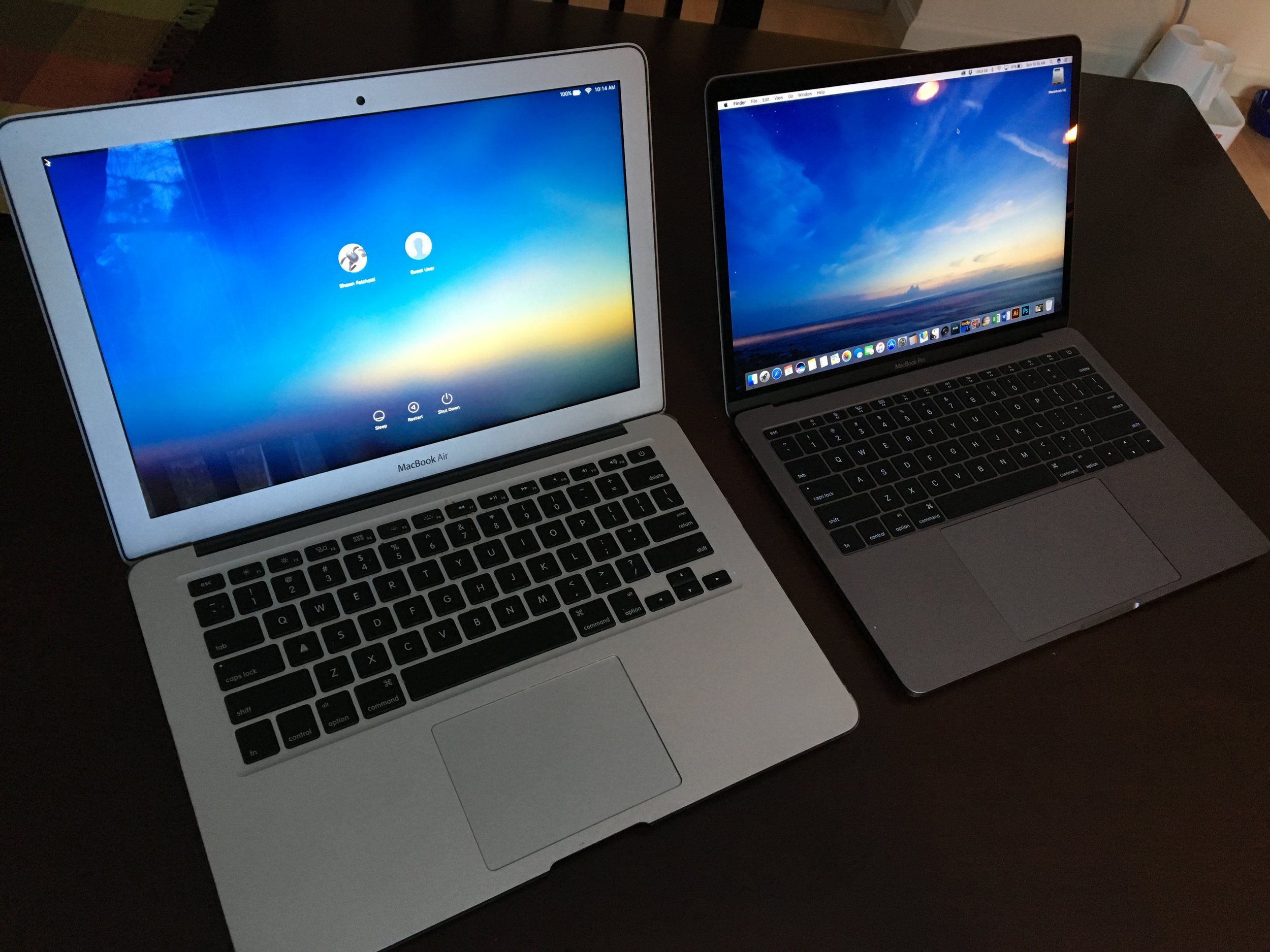
There's a little bit of perspective exaggerating the difference in that photo, but still, it's a huge difference. The second thing is the jump from non-Retina to Retina screen combined with the increase in color gamut. Here's the effect the resolution change has on the same text in Scrivener's binder:
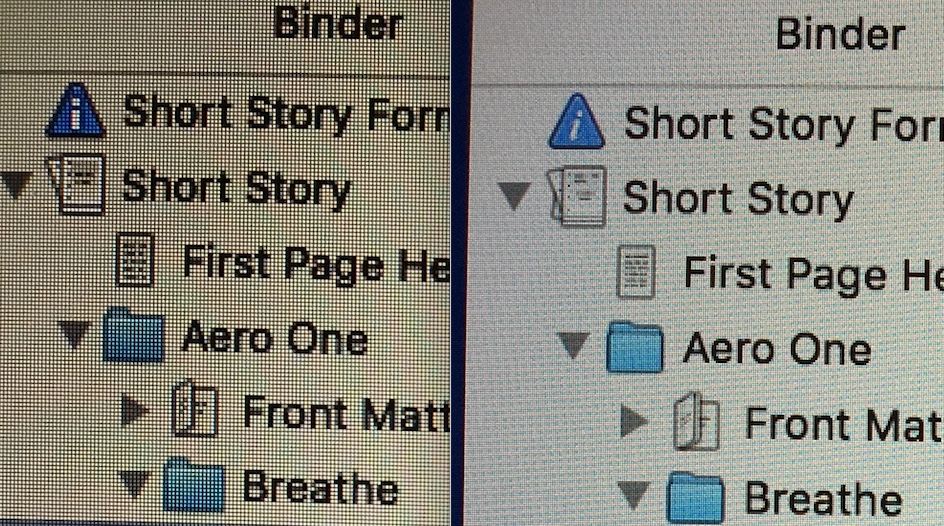
Left: Macbook Air display; Right: MacBook Pro
The color's a little harder to see in screenshots, although with your eyes it smacks you in the face:
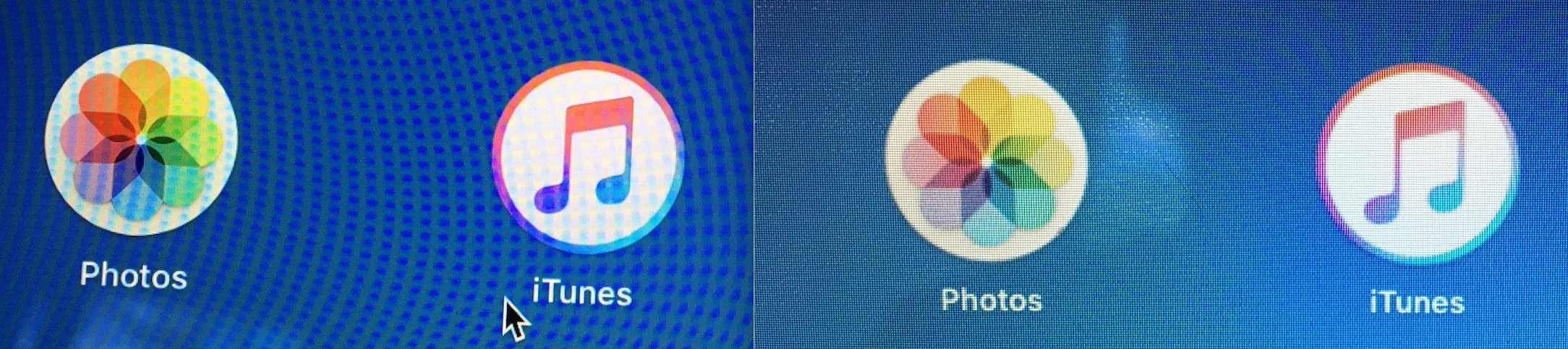
Left: Macbook Pro display; Right: MacBook Air
So, this leaves the keyboard. Many YouTube reviewers said they hated it at first, but after a month, they loved it. I don't know if I'll end up there. I do realize I'll adjust to it the same way that I adjusted from typing on a desktop versus laptop. I haven't done extensive typing yet on the new keyboard, but during the days-worth of typing since buying the new computer I've adjusted and can type accurately. Both of my wrists get a little sore on the tops after typing, however, so hopefully I'll determine how to adjust my typing angle to avoid this. The clacky noise of the keys seem less than what I heard in the store the first time I tried it (although they're still louder than my quiet Air's keyboard). The little click at the bottom of the keystroke feels nice and is good feedback. I just wish the keys had dampening, or if they do, well, more of it. Fans of the keyboard say that the old style is squishy and unstable and the new keyboard is laser-accurate. I think it's a solution in search of a problem which made more sense on the super-thin MacBook than it does on the thicker MacBook Pro. All I can say about it is that you should try it in the store first. Here's a picture so you can see how much the keys rise above the laptop surface:

0.5 mm of travel. They keys are raised enough that you can find the right keys comfortably with touch typing, however.
A few other features which weren't major selling points for me, but really stand out:
- The speakers are fantastic. Loud and clear with nice bass and stereo separation. Probably the first laptop I'd consider listening to music with the built-in speakers.
- The ginormous touchpad is fun and I prefer it to my Air's
- The much-complained about USB-C change doesn't phase me. I bought a $10 adapter. I never used all of the ports on my Air. Only having two USB-C ports doesn't bother me, either, because with USB-C you can plug in hubs which give you as many ports as you need. Not being able to plug my iPhone into my computer without the adapter doesn't bother me because who physically plugs his iPhone into his computer anymore?
- The space gray color looks great, but it's a smudge magnet. This might be the first time I purchase a skin for the upper case.
So, there you have it. Once I write a story on it, I'll post an update on my keyboard experience.

The Customer is Always Wrong
I giddily trekked to test out the new Macbook Pro, only to have expectation and reality diverge.
For the past week I've hovered my cursor over the Bhphoto cart. Nestled inside was a space gray 13" Macbook Pro. Like a siren to rocks it beckoned me. Two hesitations prevented me from clicking the buy button:
- It's very expensive
- I read several reviews warning me about the new butterfly keyboard
To end my analysis paralysis, I decided to trek down to BestBuy and lay my hands on it. I was a bit giddy, envisioning finally making a decision, buying it, and unboxing it today.
Expectation and reality diverged, though, and I left empty-handed.
The keyboard was a deal breaker. I'd seen videos which showed the keys barely depress - only 0.5 mm of travel - but it didn't quite capture the experience of trying to type on them. It's somewhat better than trying to type on the glass screen of a virtual iPad keyboard. The keys are nearly flush with the surface (they are slightly raised), wide, and a little concave. It doesn't take much force to register a keystroke, and the key makes a clack when depressed. Here's my perception, compared to the keyboard of my current 2012 Macbook Air:
- I was able to touch type, but I made numerous typos. The height of the keys messed up my aim, and it was easy to catch the corner of a neighboring key.
- The clacking sound was louder than the quiet key presses of my Air. It wasn't a big deal, though. Still much quieter than the sound of a desktop keyboard. I found the clacking pleasant, although I suspect someone sitting next to me would think I was an angry typer.
- I felt that, with practice, I could acclimate to it and make less typos.
- My wrists and hands became sore as I typed. In fairness, some of this can be attributed to standing while typing. I typed a dozen paragraphs to try and get a feel for it. I also tried typing on some other conventional laptop keyboards for comparison. The more I used the Macbook Pro's, the more I felt I would dread using it for fiction writing.
So there you have it. "Dread using it" is never a good selling point. Which is too bad, because I loved the rest of the computer:
- The new, ginormous touchpad is fantastic. It doesn't actually move when you click it, but instead tricks you into feeling like you've clicked it through haptic feedback (vibrations). No matter how I pressed it I was always certain it moved and physically clicked. It felt better than my Air's trackpad, which actually does move and physically click - probably because the Air's is hinged and has a limited click angle.
- The screen is gorgeous. The saturated colors remind me of something you'd see on an OLED display.
- The svelte factor is nice. I liked that the Pro weighed the same as my Air.
As an aside, I also looked at the Surface Book by Microsoft. I'm an artist, also, and the pressure-sensitive stylus was a nice selling point. My perceptions:
- The keyboard on the Surface Book is a joy to type on. 1.6 mm of key travel (vs. Macbook Pro's 0.5 mm) and cushy dampening. I think this is an important point because it's not just how far the keys travel but also what happens at the end of travel and how much force it takes to press them.
- The Surface Book has a neat trick where the screen separates and becomes a 13" tablet. The tablet is remarkably light and feels great to hold. It also runs a full version of Windows 10. I could definitely see myself sketching in Photoshop with the tablet and pen on my lap.
- On the downside, and this was why I didn't buy it, the tablet makes the laptop's screen top-heavy. I am constantly picking up my Air by the corner and moving it around. It felt very awkward to do this with the Surface. Plus, when the Surface is closed it folds over like a newspaper. Carrying it around felt like carrying a Trapper Keeper.
For now I'm typing happily on my trusty Macbook Air. I had to admit that I'm disappointed that Apple peaked in knowing what its consumers wanted. I recall back in the 90s seeing colorful Macs with translucent plastics but passing them over because they just weren't functional for what I needed. They sure looked nice. The new Macbook Pros have moved back into this category for me. Hopefully Apple will get their act together, stop telling us what we want, and try listening.

Reviews and Ratings
Reviews turn the cogs of Amazon, but they also help me choose which storylines to explore.
This week I gave away all of my stories for free. If you missed the giveaway, you can still get any story for 99 cents.
If you read a story, I'd love to hear what you thought on Amazon or Goodreads.
You're probably like me when shopping for new books. Your eyes scroll down to the number of reviews and the book with no reviews gets skimmed past. It's a tough hurdle to clear as an indie author.
Besides just helping others find books, reviews are upvotes for storylines and characters. 43 Seconds has James and Ananke, Signal Loss has Kyan and Rios, and Aero One has Jia and Ping. Which characters would you like to hear more from? What will James do next with Bernard's Beauty? Will Kyan change his mind and use the card James gave him? What was the bigger story behind Watts and the crew of the Egret? Will Jia try and track down Ward? Your feedback will help me determine which storylines to develop.
Amazon asks for a star rating and a little text. The text can be brief. For example, one reviewer for 43 Seconds wrote "Smart and interesting. Looking forward to more from this author" (thank you!). Goodreads, on the other hand, allows you to just leave a star rating if you choose.
You get reach all of my books via my Amazon author's page and Goodreads author's page.
Thanks for reading my stories, and, as always, keep dreaming big.

My $1.34 Ad Campaign
One of the lesser known benefits of Kindle Select is the ability to create Amazon ads. There it was, the ad button, beckoning me. Of course I pressed it.
At the end of this past week my ninety-day exclusive Kindle Select contract with Amazon expired. One of the lesser known benefits of Kindle Select is the ability to create Amazon ads. There it was, the ad button, beckoning me. Of course I pressed it.

"Maybe it does something good, maybe it does something bad."
You have two ad options: sponsored or product. Sponsored ads appear with keyword searches. Products ads appear when people look at specific books.
I chose Sponsored. You enter the title and description text for your ad, choose a daily budget and your keywords. Amazon suggests several based on phrases which have led to your book, but you can add custom ones.
And now, the tough part: determining the maximum bid for each keyword. When someone enters your search phrase, Amazon checks all the active ads using these phrases and the highest bidder wins. The actual bid will be one penny above the second place bidder.
Note you don't actually pay anything at this point. This gets you an impression (that is, your ad appears on the search page). Impressions are free. You only get charged if someone clicks on the ad.
What happens after the click doesn't matter. You pay once the click occurs, regardless if a sale occurs.
So, the internet told me to expect 1 click every 1000 impressions. Somewhere between 1% - 10% of those clicks will turn into sales.
And...math. My 99 cent book pays me a 35 cent commission. If I could miraculously manage a 100% click-to-sales rate, then it would be unwise to pay more for a click than my commission ($0.35). At a 10% click-to-sales rate, I shouldn't pay more than 1/10 of my commission. This caps my bid at a depressing $0.03.
So, I start with that, just to see what happens. And....zero impressions. Everyone's bids are higher than mine.
In the spirit of science, willing to take a loss, I up the bid. My max daily budget is capped at $6, so, I can't get into too much trouble. Amazon's ad dashboard actually encourages tinkering by showing you all of your keywords, bid amounts, impressions, clicks, and sales.
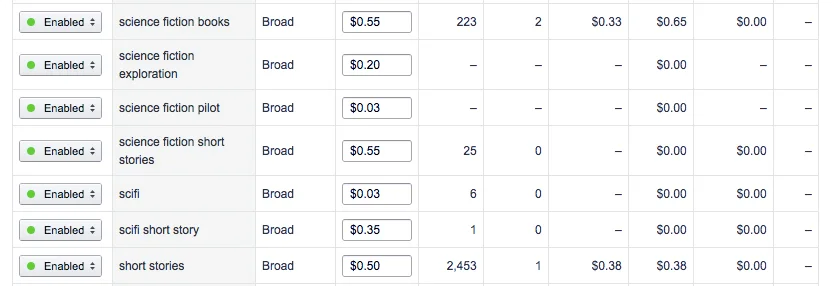
You can quickly deduce from the screenshot that "science fiction books" at 2 clicks in 223 impressions is a much better match than the general "short stories" at 1 click in 2453 impressions.
After after two days, my rate looked like this:

Similar to what the internet told me. One click every thousand impressions. My average winning bid was $0.34. Which, incidentally, means that my book would need to sell at $4.85 to break even on the ad.
I think that, with some keyword tinkering, I could probably lower my max bid and still get impressions with better targeted keywords. You can see "sci-fi" in the first screenshot has a CPC bid of $0.03 and still got 6 impressions. I think, though, it's probably not worth it to do ads for 99 cent books.
The real time analytics of the dashboard were helpful though to see how different keywords performed, and this gave me some data to update my book's regular sale keywords.
At the end of the ad run, I only had the 3 clicks, costing me $1.34. There were no sales, but I did get some insight into how different keywords performed, which was not a bad investment for a little more than a dollar.
Take My Book, Please
Recently I tested the Facebook Boost Post button, despite the internet telling me never to press it, and, not surprisingly the only effect it generated was vacuuming a ten dollar bill out of my wallet.
I've been trying inexpensive marketing experiments. Recently I tested the Facebook Boost Post button, despite the internet telling me never to press it, and, not surprisingly the only effect it generated was vacuuming a ten dollar bill out of my wallet. Like a gambler watching the dealer scoop up the chips of my losing hand, I slapped another ten on the table, took a swig of my drink, and said, "Deal 'em again, Sam."
I decided to change up the game, however. The past two week experiment has been with Amazon Giveaways. Amazon makes it very easy to set up a Giveaway either for your physical or digital book. Just scroll to the bottom of your reviews, and you will find the Giveaway button after the last review:

Next, you choose your lottery options. I chose Random, 1 in 50 chance, 10 prizes to give away. Amazon informed me this would result in somewhere between 450 - 500 entrants. Note you are purchasing however many copies you plan on giving away at the time that you set up the giveaway, but on the plus side you will get royalties for these purchases (at some point, more about that later):

Next, you set any requirements to enter. You can set no requirements, or require people to follow you on Twitter, or Amazon, view a video, or take a poll. I chose Follow S.D Falchetti on Amazon:

Incidentally, you should follow yourself on Amazon. This way you will see what the button does. As I suspected, followers get notifications of your new releases with links to buy them.
You set the duration (I chose the default 15 days). There's also a legal note that only US residents can enter, which seems to be an Amazon requirement.
On the last screen, you add your win/lose messages, and product details:
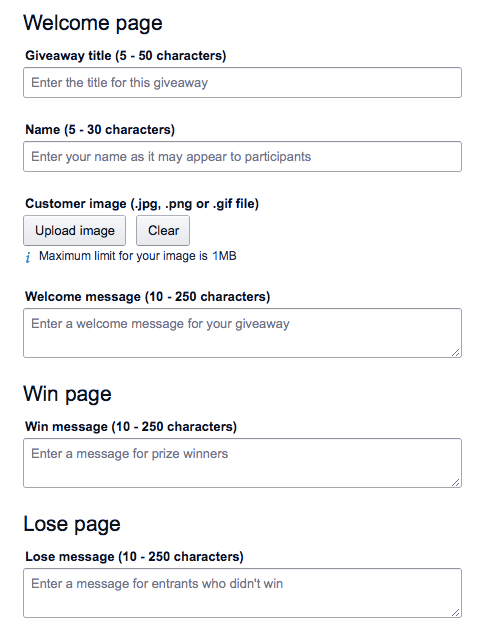
In the win message, I thanked them for entering and asked them to leave a review. In the lose I suggested they download the free sample.
You can also upload a custom image for the giveaway. I suggest doing this, because I left it at the default Amazon product image which resulted in Twitter cropping the book cover to this:

There is no way to edit the Giveaway once you submit it. The only way I was able to fix this was by making a custom graphic and using Twitshot to attach it to the link:

Once you submit it, it will go live probably with an hour. It's up to you how to promote it:
- Share the giveaway link directly with a specific audience (email it just to your newsletter followers, for example)
- Share it with everybody. The easiest way to do this is to use the #AmazonGiveaway hashtag in Twitter, which will be picked up and retweeted. I should mention that many people enter giveaways for fun, and not everyone who wins a copy will read it.
I posted it on my Twitter account with the #AmazonGiveaway hashtag. Within one hour 380 people (out of 500) had entered, winning 7 of the 10 books. Then, it petered to a trickle. I got 1-10 entrants per day for the remaining two weeks. Two more books were won, and I was left with one unclaimed book when the giveaway ended. Amazon allows you to set up a new giveaway for unclaimed books, or simply gift them to people. I gifted it.

How it all panned out:
- 9 out of 10 prizes claimed, most within the first hour
- 460 new Amazon followers
- Zero new sales
Royalties:
- As people won prizes, royalties for those prizes showed up on my royalties report.
Sales Reports:
- The 10 books I purchased as prizes did not show up in my sales report until all 10 books were claimed. Because I had one book left after the giveaway concluded, it was not until I gifted that remnant and the person accepted the gift that all 10 sales showed up in my sales dashboard at once.
Sales Rank:
- The giveaway had zero effect on my Amazon sales rank, even when the 10 books finally showed up in my sales dashboard. I found this odd because if I bought ten copes and simply gifted them, they would show up as both sales and sales rank.
Reviews:
- I'll admit, I didn't expect any reviews. Review-to-purchase ratio on Amazon is between 0.1% - 1%, so you really need to sell more than a hundred copies to have a chance at one review. But, one of the prize winners did leave a 5 star review (thank you! you're awesome!). She wrote:
I won this through a giveaway and very thrilled I read it. Once I started reading it I couldn't stop. Would of definitely bought and looking forward to reading more from the author.
All in all, not a bad experience. I picked up a few hundred Amazon followers, who will get notifications as I publish new releases, and a 5 star review. I might do it again for another book.

Tales of a Rookie - Part 3
Last week I posted a book trailer for 43 Seconds on my Facebook page. You may have noticed an enticing "Boost Post" button sits at the bottom of your page posts. I've always ignored it. But there it sat, calling to me like a siren leading a sailor to rocks.
Self-promotion is a necessary evil of indie publishing. I could just hand it over to my agent, except I'm my agent. I feel a bit like Barf from Spaceballs:
Last week I posted a book trailer for 43 Seconds on my Facebook page. You may have noticed an enticing "Boost Post" button sits at the bottom of your page posts. I've always ignored it. But there it sat, calling to me like a siren leading a sailor to rocks.
So I Googled it, and the internet told me never to press that button. Instead, just go light a handful of my own money on fire. It would have the same effect.
Of course I immediately pressed the button. Sure, the wisdom of the internet said it was pointless, but I was willing to conduct a ten dollar experiment. The boost button creates a type of ad which shows up in people's feeds. Just like regular ads, you configure your target audience and create a duration. When the duration and money are used up, the ad ends.
I boosted my video trailer for two days in the United States targeting men 18 - 55 using keywords related to science fiction. I added a link to my Amazon's book page with a teaser "Hop in the pilot's seat with James for 99 cents at http://amzn.to/28TDGpt." As the two days progressed, Facebook sent me cheery updates about all of the extra reach my post achieved. At the end, it gave me a summary:

Fifteen hundred people reached (which means, appeared in their newsfeed) with 364 video views. Facebook autoplays videos, so this was really 364 autoplays. 27 people actually clicked the play button on the video. Zero people clicked on the teaser link. The Likes/Shares were existing Facebook page fans.
Interestingly, demographics are also reported. Twice as many people in the 18-24 year old bracket had the video play in their feed. Because these were autoplays and not actual clicks, I interpreted this as 18-24 year olds were more likely to have the science fiction keywords in their interests, meeting my ad criteria. It's also possible Facebook simply has more users in the 18-24 age bracket than older brackets.

Lastly, the final test: sales. No impact on book sales. Doh! The wisdom of the internet was right.