Take My Book, Please
Recently I tested the Facebook Boost Post button, despite the internet telling me never to press it, and, not surprisingly the only effect it generated was vacuuming a ten dollar bill out of my wallet.
I've been trying inexpensive marketing experiments. Recently I tested the Facebook Boost Post button, despite the internet telling me never to press it, and, not surprisingly the only effect it generated was vacuuming a ten dollar bill out of my wallet. Like a gambler watching the dealer scoop up the chips of my losing hand, I slapped another ten on the table, took a swig of my drink, and said, "Deal 'em again, Sam."
I decided to change up the game, however. The past two week experiment has been with Amazon Giveaways. Amazon makes it very easy to set up a Giveaway either for your physical or digital book. Just scroll to the bottom of your reviews, and you will find the Giveaway button after the last review:

Next, you choose your lottery options. I chose Random, 1 in 50 chance, 10 prizes to give away. Amazon informed me this would result in somewhere between 450 - 500 entrants. Note you are purchasing however many copies you plan on giving away at the time that you set up the giveaway, but on the plus side you will get royalties for these purchases (at some point, more about that later):

Next, you set any requirements to enter. You can set no requirements, or require people to follow you on Twitter, or Amazon, view a video, or take a poll. I chose Follow S.D Falchetti on Amazon:

Incidentally, you should follow yourself on Amazon. This way you will see what the button does. As I suspected, followers get notifications of your new releases with links to buy them.
You set the duration (I chose the default 15 days). There's also a legal note that only US residents can enter, which seems to be an Amazon requirement.
On the last screen, you add your win/lose messages, and product details:
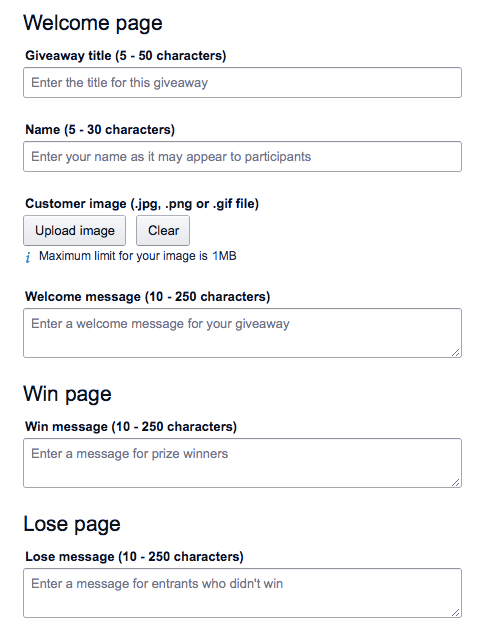
In the win message, I thanked them for entering and asked them to leave a review. In the lose I suggested they download the free sample.
You can also upload a custom image for the giveaway. I suggest doing this, because I left it at the default Amazon product image which resulted in Twitter cropping the book cover to this:

There is no way to edit the Giveaway once you submit it. The only way I was able to fix this was by making a custom graphic and using Twitshot to attach it to the link:

Once you submit it, it will go live probably with an hour. It's up to you how to promote it:
- Share the giveaway link directly with a specific audience (email it just to your newsletter followers, for example)
- Share it with everybody. The easiest way to do this is to use the #AmazonGiveaway hashtag in Twitter, which will be picked up and retweeted. I should mention that many people enter giveaways for fun, and not everyone who wins a copy will read it.
I posted it on my Twitter account with the #AmazonGiveaway hashtag. Within one hour 380 people (out of 500) had entered, winning 7 of the 10 books. Then, it petered to a trickle. I got 1-10 entrants per day for the remaining two weeks. Two more books were won, and I was left with one unclaimed book when the giveaway ended. Amazon allows you to set up a new giveaway for unclaimed books, or simply gift them to people. I gifted it.

How it all panned out:
- 9 out of 10 prizes claimed, most within the first hour
- 460 new Amazon followers
- Zero new sales
Royalties:
- As people won prizes, royalties for those prizes showed up on my royalties report.
Sales Reports:
- The 10 books I purchased as prizes did not show up in my sales report until all 10 books were claimed. Because I had one book left after the giveaway concluded, it was not until I gifted that remnant and the person accepted the gift that all 10 sales showed up in my sales dashboard at once.
Sales Rank:
- The giveaway had zero effect on my Amazon sales rank, even when the 10 books finally showed up in my sales dashboard. I found this odd because if I bought ten copes and simply gifted them, they would show up as both sales and sales rank.
Reviews:
- I'll admit, I didn't expect any reviews. Review-to-purchase ratio on Amazon is between 0.1% - 1%, so you really need to sell more than a hundred copies to have a chance at one review. But, one of the prize winners did leave a 5 star review (thank you! you're awesome!). She wrote:
I won this through a giveaway and very thrilled I read it. Once I started reading it I couldn't stop. Would of definitely bought and looking forward to reading more from the author.
All in all, not a bad experience. I picked up a few hundred Amazon followers, who will get notifications as I publish new releases, and a 5 star review. I might do it again for another book.

Tales of a Rookie - Part 2
I decided to self-publish 43 Seconds on Kindle Direct Publishing because I loved the idea of owning the project start to finish. KDP is remakably easy to use. It’s really just a few screens of selections, followed by pushing the “publish” button.
I decided to self-publish 43 Seconds on Kindle Direct Publishing because I loved the idea of owning the project start to finish. KDP is remakably easy to use. It’s really just a few screens of selections, followed by pushing the “publish” button. The steps were:
Create an account
Upload my story (in this case, a .mobi file generated from Scrivener)
Upload my cover art
Enter my product details (title, blurb, author name, etc)
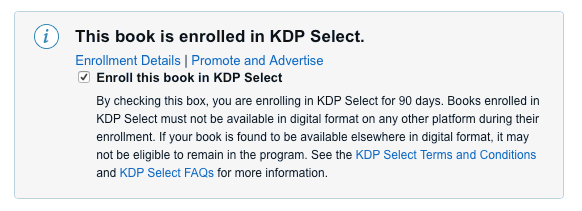
Choose if I wanted to enroll in Kindle Select (90 day exclusive contract with Amazon) or just Kindle Direct (non-exclusive)
Select my markets/royalty options
Click publish
Once I clicked “publish”, the story went into Pending status. After thirty minutes, it was live.
The main decision point was Kindle Select versus Direct. I chose Select (90 day exclusve contract) for the following reasons:
People with Kindle Unlimited can read it for free (more people may see it, and potentially leave a review)
I can choose five promotion days where I can offer the book for free, or at a discount. The days do not need to be consecutive. I planned offering them the first weekend after launch to try and get more people to see it, and potentially leave a review.
I don’t have any other markets yet (iBooks, epub) for the story, so I wasn’t losing anything by limiting myself only to Amazon for 90 days. I can always add other markets after the 90 day contract.
Once the book was live, I was able to create an Author Central account and begin filling in my bio. This is the page people see when they click your name on Amazon. It has options to link your personal website/blog, so I hooked those up to my blog.

Self-Marketing
I made a Facebook author page, invited my friends, and posted updates about the upcoming free download weekend
I’m also an artist, and have an established Facebook page for selling art. It’s taken me years to grow it to 500+ fans. I did a bit of self cross-promotion and announced the upcoming free download weekend along with links to my writing page. Based on demographics I didn’t think there were many sci-fi fans in my art group, but even if I picked up one or two it was helpful.
I added a banner to my website announcing the free download dates, with a direct link to the Amazon page.
Results
I ran a three day free promotion on Friday, Saturday, and Sunday. Amazon doesn't disclose who bought your books, but it does tell you which Amazon regional site sold them. The results were:
Books sold during the free promotion:
- Amazon.com, 7 sales
- Amazon.de, 4 sales
- Amazon.com.au, 1 sale
The first day after the free promotion I had my first paid sale:
- Amazon.com, 1 sale
Sales in the US, Germany and Australia. Cool! Thanks.
Surprisingly, the 12 weekend sales were enough to get me listed at #23 on the Amazon bestseller list for the category Kindle Short Reads->45 minutes(22-32 pages)->Science Fiction & Fantasy. I noticed the list is dynamic and changes hour to hour. Today, for example, with only 1 sale, I'm listed at #911. Doh. But it was fun being at #23!

I still have 2 promotion days left to spend, which I'll use on another weekend after I get some reviews. In the meantime, I'll try to grow my newsletter and Facebook page, so I can let readers know of those promotions.
And, of course, I'll start working on my next story.